OpenZhenZhen AI 提示词画廊 · Claude Opus 5.5 · video
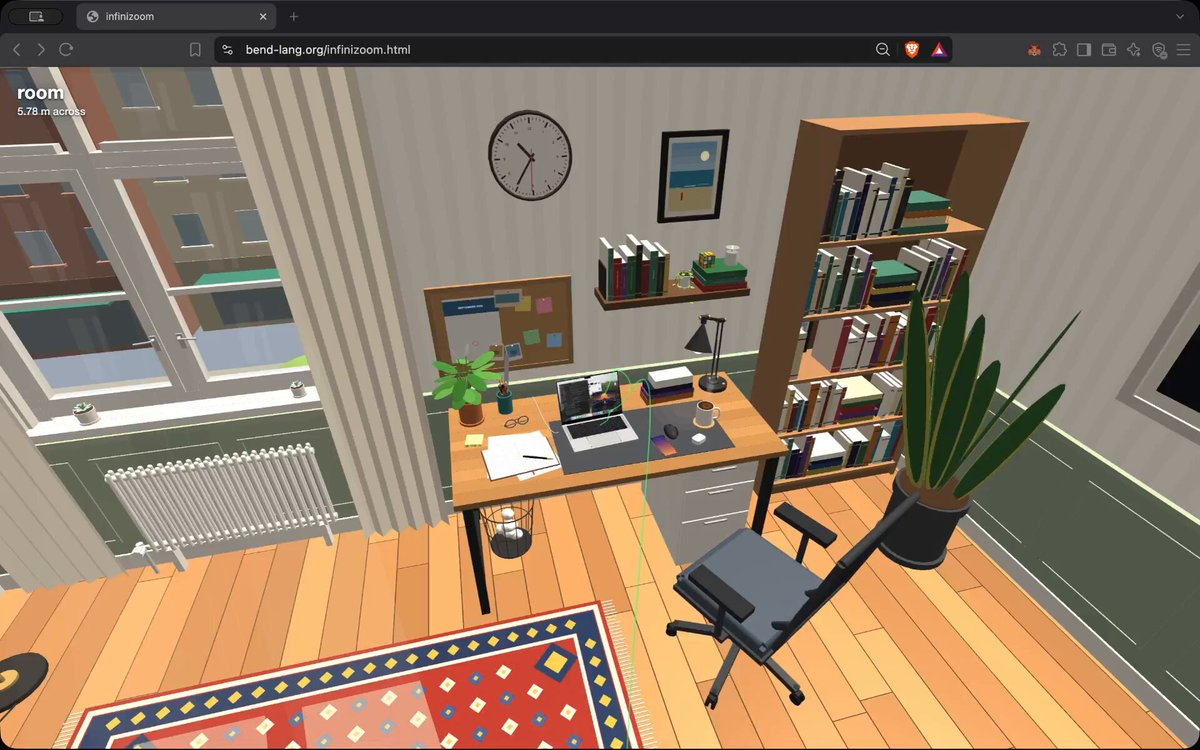
从房间缩放到夸克的3D场景
3D Scene Zooming from a Room to a Quark
一个从房间一路缩放穿过MacBook、芯片直到原子、夸克的HTML/Three.js动画,由Opus 5.5一次性更新完成,提示词发布在作者的Gist链接中。 原作需要参考素材;请自行准备图片、视频、音频、文档或代码库等输入。
提示词 / Prompt
English prompt
INFINIZOOM Build infinizoom: a procedural infinite-zoom world. The deliverable is a self-contained BunJS project. Running `bun run server` must build and serve it (wire up the corresponding "server" script in package.json). Three local assets exist in this directory and must be used: ./macbook_interior.png (a real MacBook Pro teardown photo), ./apple_m4_scheme.png (Apple's M4 die floorplan diagram), and ./wallpaper.jpg (a 1920×1200 desktop wallpaper photo). Load the wallpaper from this local file — never fetch content from external servers (the sole exception: three.js itself may be imported from a CDN by URL). The world A single 3D world is traveled indefinitely along a fixed camera track that zooms through these levels: Main route: a room → a desk → a MacBook Pro → inside the chassis → the logic board → the Apple M4 package → the M4 die → a performance core → an integer ALU block → a standard logic cell → a FinFET transistor → a material cross-section inside the fin → the silicon crystal lattice → one unit cell → an atom → its nucleus → a nucleon → a quark. Logic gates and circuits (AND, OR, etc.) should be animated as it computes. Screen branch: exactly one bifurcation, hovering above the MacBook. Choosing the other side dives into the display instead: the screen → the display panel → pixel tiles → a pixel block → one pixel → its R/G/B sub-pixel LEDs → the emissive layer → an emitter molecule → and converges to the same atom → nucleus → nucleon → quark tail. The leds must be accurate: 1-to-1 mapping from screen pixels to leds, and their colors must match the color of that pixel. The screen is animated and the LEDs are updated to match the animation in real time. Riding the track forward IS zooming in; riding backward is zooming out. The design must extend additively: adding a new structure = one render function + one call in its parent; adding a bifurcation = one more route; a future backward extension (t < 0: out the window → city → planet → universe) must require only prepending track levels. A time parameter must be threaded through everything so all animation stays possible at any depth. Architecture (hard constraints) - Mutable state is EXACTLY: one float t (position along the track), one branch bitstring (0 = left/A, 1 = right/D; a bit is pushed when passing a fork and popped when backing out below it), and raw input (keys held, mouse position). Every frame is a pure function of (t, branches, raw input, wall-clock time). No other state — no scene graph, no node objects, no stored world data, no caches of world structure. - Renderers are pure functions that call their children directly: render_room() calls render_desk() calls render_macbook() … down to render_quark(). No dispatch layer, no classes. The call stack is the scene traversal. - Scale-space warping via local unit frames: floats cannot hold meters and femtometers at once, so every renderer works in its own ~unit-sized local frame, and the camera is re-expressed into each child frame. Geometry math is done camera-relative in doubles, cast to float only at the very end, so the picture is artifact-free across all ~17 decades of scale. The exact same layout constants must place structures for rendering AND author the track — one source of truth, or the camera drifts visibly off the line. - Immediate-mode rendering over three.js: every frame, the recursion emits primitives into instanced pools; three.js is only a rasterizer. Nothing off-screen or sub-pixel is emitted or recursed into. The track and the camera - Speed: fast. The whole main ride should take roughly 20 seconds, with a comfortable, constant-feeling time per level (exponential zoom feel) and gentle easing near the fork and the track ends. - Shape: gently curved arcs. Not wandering, roundabout, or random-direction — but also NOT dead-straight rays. Soft, purposeful curves. - The green line: the track is always visible in-scene as a translucent green line. It must be an infinitesimal line: ~2 pixels wide on screen at EVERY distance, implemented as a true GL line primitive (not tubes, not rods, not meshes of any kind), transparent (never rock-solid), and it must NEVER grow wider as it approaches or passes the camera — it is literally a path line, visible both near and far. - The camera must never look at nothing. At every instant of the ride the view must be filled with structure. Concretely: every level approach is a diagonal glide (roughly 45°) over the parent surface — never a low horizontal skim (which puts empty void in the upper half of the screen) and never a straight-down drop (which degenerates the camera roll). Every level must render rich, non-uniform content at the distance where the camera arrives — never a flat gray plate. - Dive points land dead-center inside meaningful sub-structures. The line must enter the CENTER of one of the small colored squares (a specific core on the die, a specific block in the core, a specific pixel on the screen) — never a border, edge, gap, seam, or gray filler zone. The boundary transitions between levels (e.g. performance core → integer ALU block, "100 µm across") must be scrutinized: the camera must be looking at detailed structure the whole way through. - Occlusion never pops: every shell the camera is about to pierce (the keyboard deck, the transistor's gate, the LED's cathode, the screen's cover glass…) fades away smoothly as a pure function of t shortly before the camera reaches it, and fades back identically when riding out. Controls and HUD - W rides deeper, S rides back. - At the bifurcation: a big translucent ‹ on the left edge and › on the right edge of the screen, each labeled with its key (A / D), with the currently selected side highlighted/glowing. No sentence-style instruction text. - Mouse moves the glance direction with a full 360° range — the rider can look all the way around, including behind. - A title at the top-left always names where we are right now (e.g. "performance core") together with the current physical scale ("3.2 mm across"). Content — fidelity and density Everything must be densely detailed — think "10× more detail than feels sufficient" — and hiding must be un-aggressive: distant and peripheral objects stay visible; more detail is always preferred over less. Everything plausible must be animated and alive. - The room and desk: a believable day-lit room (window, curtains, floor, walls, shelf, chair, door, rug, a wall clock whose hands actually run, lamps, cables) and a believable desk (the MacBook, a potted plant, paper, a mug, books, phone, pens…). - The MacBook exterior: correct proportions, full keyboard with per-key legends, trackpad, ports, hinge, screen bezel with notch and camera. - The MacBook interior: there are many components inside a MacBook — reproduce them in pixel-perfect locations matching ./macbook_interior.png: the two fans (with visibly SPINNING, clearly readable impeller blades — use few chunky blades, not a dense blur), the S-curved heat pipe and heat spreader, the black logic board carpeted in passives with EMI shields and chips, the antenna bar along the hinge, side port boards, the 4-corner + 2-tall-center battery cell layout with printed labels, aluminum struts, the trackpad flex cable running down the middle to its gold connector, the flanking speakers, tape, thermal pads, screws — all of it. - The M4 die: block placement faithful to ./apple_m4_scheme.png (4 P-cores + shared L2, 6 E-cores + L2, 10 GPU cores, 16 Neural Engine cores, SLC, media/display engines, ISP, Secure Enclave, memory PHYs on the edges), with no bare/gray substrate anywhere — every area is a labeled block, and blocks show interior sub-structure at every intermediate zoom. The CPU interior (core floorplan: caches, decoders, schedulers, ALUs, FP units, register files…) must be greatly detailed, not a few flat rectangles. - Digital circuits doing operations — explicitly a top-priority feature: the zoom must pass through logic that is visibly COMPUTING. Standard cells are real gates (AND/OR/NAND/NOR/XOR/NOT): their input nets carry live 0/1 signals (bright = 1, dark = 0), their output is the actual boolean function of the inputs, pulses race along wires when gates switch, and whole logic blocks twinkle with switching activity at every zoom level. - Animated electronic simulation: the FinFET's gate runs a live drive waveform, and while it is open, charge carriers visibly flow from source to drain. Continue through real materials: gate oxide, dopants, the diamond-cubic silicon lattice at its true 0.543 nm pitch, into atoms with orbiting electrons, a nucleus with protons/neutrons and an animated gluon field, down to quarks. - The screen must be REAL: a real image at real MacBook-panel fidelity — the bundled ./wallpaper.jpg photo as the desktop background, with a procedurally drawn OS on top (menu bar, dock with recognizable icons, overlapping application windows: a code editor with syntax-colored lines, a file browser, a terminal with a blinking cursor, and a video window that visibly plays, animating at full frame rate). Never a mosaic of colored squares. All levels of the screen (full panel → tiles → pixels → sub-pixel brightness) must sample the SAME image function so content never changes across zoom, and detail must increase strictly monotonically as the camera approaches — at no zoom distance may the screen become LESS detailed than it was a moment before. - The sub-pixel LEDs: each LED is lit by the ACTUAL channel value of the on-screen image at that exact pixel — realistic and accurate, not default colors. Because the screen animates, the LEDs visibly CHANGE color over time. The dive targets a pixel inside the playing video, where R, G and B clearly differ from each other and keep changing. Inside, an LED is not a solid: model the full OLED stack — the TFT drive circuit with its data/scan lines and storage capacitor, the reflective anode, transport layers, the emission layer, the semi-transparent cathode, auxiliary wiring, spacers, encapsulation — with a live simulation: holes drift up, electrons drift down, they recombine in the emission layer with a flash, and photons fly up and out. Below that, the emissive layer resolves into a molecular film, then a single emitter molecule built of real atoms, joining the shared atomic tail. Visual-quality laws - Nothing ever pops, flickers, or z-fights — anywhere, at any scale, moving in either direction. In particular: never emit overlapping coplanar surfaces or nested coincident translucent volumes; and any material exempted from fog (emissive screens, glass, glow) must still be manually distance-faded and culled, or shells belonging to enclosing structures will haunt the camera at deep zooms as giant flickering planes. - All LOD transitions are smooth morphs or strictly-finer refinements of identical content — never a swap to something coarser, blurrier, or differently colored. - Spinning/periodic animations must be tuned to be perceptible (no temporal aliasing that freezes or scrambles them). - Runs at 60 fps. Code Quality Ensure your implementation is concise, minimal, elegant. Use pure functions as much as possible. Keep it very Haskell-like, even though it is TypeScript. Most of the complexity of the function comes from the different objects that are rendered, and each object is a render function. Each renderable object must live in its own file at src/render/<name>.ts — that directory is the one that scales as we add more renderables. Organize the project such that it can scale by just adding more render functions/files under src/render/. Avoid unnecessary complexity.
主题与风格
探索更多图片和视频提示词 · 生成图片 · 生成视频 · 在 AI 画布中创作
相关作品
- 玄武岩柱崖
生成一段时长20秒、竖屏9:16的电影感地质景观镜头。开场贴近一根玄武岩柱,呈现深色火山岩干净的垂直面、锐利的六边形边缘、细微裂纹、粗粝质感,以及从炭灰色到深灰色的细腻变化。镜头缓慢拉远并向左移动,逐步展现更多岩层,随后向右摇摄,掠过由密集玄武岩柱构成的巨大崖壁。突出六边形纹理宏伟而有序的重复形态,在数学般的几何感与岩石原始古老的气质之间取得平衡。采用柔和自然光、写实的岩石细节和稳定克制的运镜。画面中不出现人物、文字或额外物体。
- 有机金属太空服女性肖像
生成一段20秒、9:16竖屏构图的电影感肖像视频。使用所提供的身份参考图,保持成年女性的面部外观与身份一致。画面展示一位美丽的成熟女性,从头部到躯干上半身入镜,穿着精致的有机金属太空服,具有雕塑般的生物机械金属板、细微的氧化质感和优雅的一体化细节。背景为黑暗且富有氛围感的太空主题环境,带有柔和的体积雾和克制的未来感灯光。采用精致的人像构图、真实的皮肤与金属材质、轻微呼吸和自然的面部细微表情,以及缓慢稳定的镜头推进。全程保持解剖结构、人物身份、服装、灯光和构图的一致性。不要文字、标志、水印、音频、对白或源视频输入。
- 薄荷糖森林的驯鹿合唱
制作一段20秒、16:9画幅的定格节日动画,采用复古手工木偶风格:毛绒织物与橡胶制成的驯鹿和精灵,以清晰可见的逐格顿挫动作穿过薄荷糖条纹拐杖森林哑绘背景,周围是温暖的舞台聚光灯。六只毛毡驯鹿在巨大的糖果拐杖树干之间奔腾,蹄子踏过纸浆雪地。领头驯鹿戴着红色针织围巾,用浑厚温暖的男中音唱道:“Over the frosted hills we fly, under the candy sky!” 两个精灵慌忙躲避,扑到条纹树干后方,薄荷糖树皮碎片因冲撞而裂开飞散。2秒时切换到宽阔侧面角度;镜头快速向左平移,沿着奔跑的鹿群移动,鹿群以粗哑到明亮的粗略齐唱加入:“Ring the bells, let
- 花海精灵与白鸽
生成一段20秒、16:9画幅的写实电影感视频。一只洁白无瑕的白鸽在超写实、色彩鲜艳的花海中平静行走。一名可爱的小精灵稳稳骑在白鸽背上,拥有精致、闪烁且半透明的翅膀,翅膀捕捉阳光并柔和地散射光线。展现细致的白色羽毛、自然的行走动作、轻柔的翅膀闪光,以及微风中花朵和叶片的细微摆动;采用温暖日光和可信的阴影。使用流畅的低机位跟拍,并穿插白鸽、精灵、翅膀和花朵的特写,始终保持角色外观和动作连续稳定。营造健康、奇幻、细节丰富的氛围,具有自然运动和真实景深。不要出现文字、标志、水印,也不要要求源视频或音频输入。
- 悬浮棋子
创作一段 20 秒、16:9 的超现实主义视频。在一片边界不明、如梦似幻的虚空中,一枚棋子悬浮于半空,仿佛重力已经停止。保持其轮廓清晰可辨,同时赋予它微妙而不可能的比例变化,以及含蓄的蜕变感。抛光表面映照出奇异、流动的光线;尽管没有棋盘,柔和的阴影仍在棋子下方飘移。空旷氛围充满象征意味,令人联想到策略、权力与无意识想象。镜头围绕棋子缓慢、平稳地向右环绕。全程保持单一主体构图与神秘氛围,不出现文字或其他物体。
- 霓虹集装箱科幻废品店
制作一段20秒、16:9画幅的电影感动画序列。描绘一个建在破旧集装箱内部的小型科幻废品店。采用浓郁的漫画、日漫与数字绘画美学,融合赛博朋克霓虹、蒸汽朋克机械、黑色电影氛围和微妙奇幻元素。镜头从集装箱入口缓慢而稳定地推进杂乱的内部空间:废弃机器人、管道、齿轮、电缆、发光招牌、奇异机械遗物和层叠废料。呈现类似虚幻引擎的真实感、8K级细节、强烈对比、带体积光的大气照明、霓虹反射、飘动尘埃与淡淡蒸汽。保持场景视觉统一、纹理丰富,并聚焦神秘的店铺环境。不要对白、字幕、标志、源视频或音频输入。